8 tricks that Can Save You on Whatsapp

WhatsApp is the most popular instant messaging app. There are many features and tricks many users are still not aware of. So we’re are going to list those features and tricks to enable you enjoy your WhatsApp usage to the fullest.

1. WhatsApp Calling

If you are still not aware, users are now making calls through their WhatsApp. You only need to have Internet access, just like you need to have for normal chatting. To be able to join the league of users rocking this feature, you need to update your WhatsApp to the latest version.


2. Hide “Last Seen” Timestamp and Blue Ticks for Read messages

Whatsapp Last Seen Feature and the blue double ticks for Read Messages are not liked by every Whatsapp User. That’s why WhatsApp allows you to turn off the last seen and blue double ticks. Some users don’t like this feature for security and privacy reasons.

To change these settings, simply go to WhatsApp > Menu Button > Settings > Account > Privacy . You can then change the Last Seen to Nobody . To turn off the double ticks for read messages, untick the Read Receipts checkbox.


3. Backup And Restore WhatsApp Chats

Your WhatsApp messages are automatically backed up and saved on your phone’s memory daily at 4am. If you delete WhatsApp from your phone and don’t want to lose any of your messages, be sure to manually back up your chats before uninstalling:

Go to WhatsApp > Menu Button > Settings > Chat Settings.
Tap Backup Conversations.

4. Lock Your WhatsApp

In WhatsApp, we do lots of private chat with our friends and family. If you usually give out your phone and you don’t want anybody to see your whatsapp messages, use WhatsApp Lock for protecting your WhatsApp messages. WhatsApp Lock is a very popular Android app for locking your WhatsApp app. Download Whatsapp Lock from Google Play Store.


5. Stop WhatsApp Images from Appearing In Gallery Or Camera Roll

If your friends or kids take your Android mobile for some reasons and they see your photo gallery, they will also see your WhatsApp photos. On Android, you have to create a .nomedia file in WhatsApp’s images or video directories. To do this, you need a file explorer such as ES File Explorer. Navigate to the images or video folders. Tap the New button in the lower left, pick File and create a file named .nomedia. This will stop the Gallery from scanning the folder.

6. Change Your WhatsApp Phone Number

If you changed your mobile number recently and don’t want to lose your WhatsApp contacts. Follow below guide for changing android mobile number in WhatsApp Android App.

Go to Settings > Account > Change number. Enter your old phone number in the top field and then your new phone number in the bottom field. Then press Done. Verify your new phone number, and all your chat history, groups and so on will be migrated to the new number.


7. Use WhatsApp on Your Computer

WhatsApp is so popular on mobile phones. But what happens when you’re working with your computer and needs to reply to someone’s messages and your phone is out of reach? That’s why WhatsApp has introduced the Web version of this messaging app. Click Here to Access Whatsapp on PC


8. Send one Whatsapp Messages to All Whatsapp Users

Sending Broadcast messages is very simple. With this feature, you can broadcast one message to your selected contacts at the same time, similar to Bulk SMS. You have to create a new broadcast by following the steps below.

Go to Menu > New broadcast
Add contacts to the broadcast and tap Create
Enter your message in the broadcast to send to everyone at the same time.


How to Play Pac-Man on Google Map This Easter Period


Steps on How to Play Pac-Man on Google street View
1. Launch your Browser (Preferably Chrome)
2. Enter Google Map URL (maps.google.com)
3. Choose the Street you Love
4. Click Pac-Man Icon on the Lower Left of your Screen

5. The Street Then turn into Pac-Man Environment
6. Click Start.

Note: You can Use your direction buttons on your Keyboard to Move Up,Down, Left, Right.
           You can Share your Scores on Social Networks


WhatsApp for Android now offers voice calling

You can make free calls to Whatsapp Users On Android ,WhatsApp users on Android can now all tap into the app's new voice-calling feature.
Rolled out in February to a small number of people, the call feature then expanded to invitation-only by those who were able to get the feature. Now it's available to all Android phone users.


Now owned by Facebook, which paid $19 billion to acquire it, WhatsApp started life as a basic text-messaging app but one that also offered the ability to leave voice messages. The company has been promising to add a phone-calling feature, which would give the app the leverage to compete against similar services such as Skype and Viber. At last year's Mobile World Congress, WhatsApp co-founder Jan Koum said the voice calling would roll out to Android phones and the iPhone first, and then to Windows Phone and some BlackBerry phones.


10 Reasons You Will Choose a Samsung S6 Over Iphone 6

Beginning in two weeks on April 10th, we’re in store for an epic battle of the sixes. Apple’s iPhone 6 burst onto the scene this past September and helped Apple rack up more profit in the holiday quarter than any other company has ever earned in a three-month period. iPhone 6 sales are still going strong according to estimates, but the phone will finally see some real competition next month when the Galaxy S6 and Galaxy S6 edge hit store shelves.

All three of these phones are fantastic options, but there are a few key features on Samsung’s new handsets that could make iPhone 6 owners a bit jealous. In this post, you’ll find 10 of the most impressive things the Galaxy S6 can do that Apple’s latest iPhone can’t.


1. Fast charging

Apple’s iPhone 6 is pretty quick to charge, especially if you use this terrific trick to speed up your iPhone charging. It’s nowhere near as fast as the Galaxy S6 though, which includes fast-charging technology.

In just 10 minutes, you can add hours of standby time to your Galaxy S6’s battery.

2. Wireless charging

It’s nowhere near as cool as the new wireless charging technology we saw debut at CES 2015, but Samsung’s Galaxy S6 and S6 edge include built-in support for wireless charging. You can also get a free wireless charger with your purchase of the phone if you buy it from Best Buy.

If you want wireless charging on your iPhone 6, you’ll need to use this hack or buy an ugly third-party case.

3. Run more than one app at a time

Apple’s iOS platform supports multitasking, but only one app can be used at a time. With the S6 and S6 edge, you can open two apps side by side and even copy content from one and paste it in the other.

4. Wake a small part of the screen to see notifications

Samsung’s rub-to-wake gesture might be ridiculous, but it’s pretty cool that you can wake the side panel on the Galaxy S6 edge to see notifications without having to unlock or even pick up your phone.

5. See who’s calling without picking up your phone

If you have your Galaxy S6 edge face-down on your desk and one of your favorite contacts calls, the edges will glow with a specific color associated with that contact.

Here’s a GIF of the feature in action:

6. Make mobile payments anywhere

…when Samsung Pay launches.

Apple Pay is a fantastic service that couldn’t be easier to use, but it’s still not available in most stores. Samsung Pay, on the other hand, uses a hybrid technology that’s compatible with newer NFC payment terminals as well as older standard credit card terminals.

Both new Galaxy S phones support Samsung Pay, which will launch later this year.

7. Tracking auto-focus

Samsung’s new camera in the Galaxy S6 and Galaxy S6 edge is phenomenal, and a few features are of particular interest. One is tracking auto-focus; simply tap on an object and the Galaxy S6’s camera will constantly adjust focus as it moves, or as you move.

The feature works for still photos or while you’re recording a video.

8. Fast-opening camera

If you double-tap the Galaxy S6’s home button even while the phone is asleep, the camera will open and be ready to capture a photo in a lightning-fast 0.7 seconds.

The iPhone 6’s camera is pretty easy to open as well thanks to lock screen and Control Panel shortcuts, but it’s nowhere near as fast as the Galaxy S6.

9. Use your phone as a TV remote

iPhone 6 users can buy third-party accessories if they want to use their handset as a TV remote, or some apps include compatibility with specific set-top boxes. The Galaxy S6, however, packs in infrared blaster that can control just about any device you want.

10. Monitor your heart rate

There are apps that will use the iPhone 6’s rear camera and flash to measure your heart rate, but the dozen or so apps I have tested are slow and often inaccurate. The Galaxy S6 and S6 edge pack a dedicated heart rate monitor that reads your pulse instantly and is very accurate.


Facebook Launches Payment Platform to compete against PayPal and Venmo


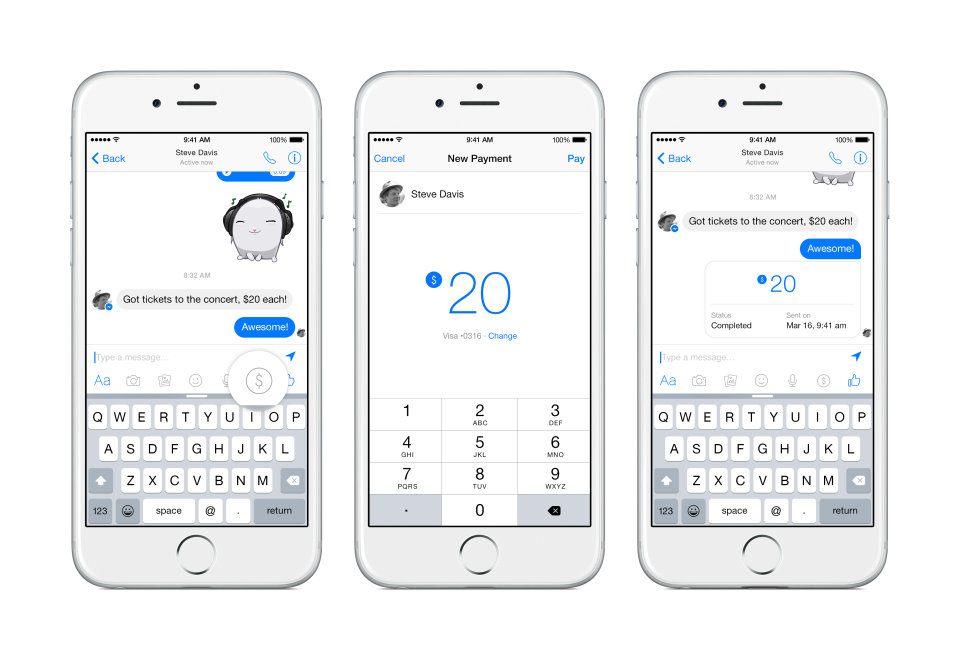
When you chat with friends about settling debts or splitting the bill, Facebook doesn’t want you to have to open another app like PayPal or Venmo to send them money. So today it unveiled a new payments feature for Facebook Messenger that lets you connect your Visa or Mastercard debit card and tap a “$” button to send friends money on iOS, Android, and desktop with zero fees. Facebook Messenger payments will roll out first in the U.S. over the coming months.

 
Send Money to Friends in Messenger from Facebook on Vimeo.

TIPS

To send money:
1.Start a message with a friend
2.Tap the $ icon and enter the amount you want to send
3.Tap Pay in the top right and add your debit card to send money

To receive money:
1.Open the conversation from your friend
2.Tap Add Card in the message and add your debit card to accept money for the first time

The money you send is transferred right away. It may take one to three business days to make the money available to you depending on your bank, just as it does with other deposits.

10 reason to pick iWatch over Android Watch

The Apple Watch does a lot of the same things as the Android-based watches, such as delivering text messages and notifications and tracking your health.
But there are several fundamental differences in how you actually interact with the Apple Watch compared to other android gadgets such as the Moto 360, LG G Watch R, and other Android Wear watches.
Here's a look at some of the biggest things that make the Apple Watch stand out from the competition.

1. The King : If you buy the Apple Watch Edition, you can use its fancy box as a charger.

2. You can add new bits of Information, to a watch instead of just changing it e.g weather.

3. You can draw a sketch on your watch and immediately send it to another Apple Watch wearer.
4. You can pay with your watch by simply waving your wrist over an NFC payments terminal.
5. Force Touch: You can perform action by pressing hard or softly on the touch screen (i.e. a hard press may launch a menu within the music app etc.).
6.  You can Scroll and zoom using Digital Crown instead of a touch screen.
7. You can send a Vibration to another wearer’s wrist.
8. You can send audio snippets as a reply to a text message
9. You can send your heartbeat to another apple watch wearer.

10. You can View all of your apps on one home screen

CheckOut iWatch Prices


Tim Cook revealed Yesterday the following prices for the various models of the Apple Watch:

• Apple Watch – 38mm: $549 – $1,049 (Prices vary based on watch band)
• Apple Watch – 42mm: $599 – $1,099 (Prices vary based on watch band)
• Apple Watch Sport – 38mm: $349
• Apple Watch Sport – 42mm: $399
• Apple Watch Edition: $10,000+ Tim Cook Said the iWatch could be the solution to a keyless Car. do you think So? Would you buy an iWatch? Preorders and in-store previews begin on April 10th and the watches will start shipping on April 24th.

Meet The Solar Plane to Travel Across The Globe


A Swiss solar-powered plane has taken off from Abu Dhabi, United Arab Emirates marking the start of the first attempt to fly around the world without a drop of fuel, Al Jazeera reports.
The Solar Impulse 2, piloted by Andre Borschberg of Switzerland, took off at 7.12am local time (0412 GMT) on Monday from the UAE’s Al-Bateen airport and headed to Muscat, the capital of Oman, where it is expected to land later after the first leg of the journey.
The developers said the aim was to create awareness about replacing “old polluting technologies with clean and efficient technologies”.
Andre Borschberg, Solar Impulse co-founder, was at the controls of the single-seater when it took off from the Al Bateen airport in the UAE on Monday morning.
The take-off, which was originally scheduled for Saturday but delayed due to high winds, capped 13 years of research and testing by Borschberg and fellow Swiss pilot Bertrand Piccard.
The pilot would take turns to fly the plane around the world and switch seats during stopovers.

Two hours and 15 minutes into the flight, Borschberg was 13 per cent of the way to Muscat and attempting to give media interviews before calling his wife, according to a website monitoring his progress.
Shortly before take-off, Borschberg, 63, said on Twitter that the “challenge to come is real for me and the airplane”.
“This project is a human project, it is a human challenge,” Borschberg said on Sunday.
The wingspan of the one-seater plane, known as the Si2, is slightly bigger than that of a jumbo jet, but its weight is around that of a family car.
From Muscat, it will make 12 stops on an epic journey spread over five months, with a total flight time of around 25 days.
It will cross the Arabian Sea to India before heading on to Myanmar, China, Hawaii and New York.
Landings are also earmarked for the midwestern US and either southern Europe or North Africa, depending on weather conditions.
The longest single leg will see a lone pilot fly non-stop for five days across the Pacific Ocean between Nanjing, China and Hawaii, a distance of 8,500km.
Borschberg and Piccard will alternate stints flying the plane, which can hold only one person, with the aircraft able to fly on autopilot during rest breaks.
The pilots have undergone intensive training in preparation for the trip, including in yoga and self-hypnosis, allowing them to sleep for periods as short as 20 minutes but awaken feeling refreshed.
All this will happen without burning a drop of fuel.
The pilots will be linked to a control centre in Monaco where 65 weathermen, air traffic controllers and engineers will be stationed. A team of 65 support staff will travel with the two pilots.
Should a problem occur while sleeping, the ground staff can wake up the pilot.
“We want to share our vision of a clean future,” Piccard, 57, who is chairman of Solar Impulse, said of the mission.
“Climate change is a fantastic opportunity to bring in the market new green technologies that save energy, save natural resources of our planet, make profit, create jobs, and sustain growth.”
The pilots’ idea was ridiculed by the aviation industry when it was first unveiled.
But Piccard, who hails from a family of scientist-adventurers and who in 1999 became the first person to circumnavigate the globe in a hot air balloon, clung to his belief that clean technology and renewable energy “can achieve the impossible”.
The plane is powered by more than 17,000 solar cells built into wings that, at 236ft, are longer than a jumbo and approaching that of an Airbus A380 superjumbo.
Thanks to an innovative design, the lightweight carbon fibre aircraft weighs only 2.3 tonnes, about the same as a family 4×4 and less than one percent of the weight of the A380.
The Si2 is the first solar-powered aircraft able to stay aloft for several days and nights.


Samsung Galaxy S6 and S6 Edge Specifications


Reading about the various specs for the Samsung Galaxy S6 and S6 Edge. Here comes the official release of Samsung Galaxy S6 and S6 Edge annouced at Mobile World Congress in Spain last week.  the S6 and S6 Edge will both feature Samsung’s own processors. This might also go some way to explaining the reduced battery life in these phones in comparison to the S5. Samsung has said that the new, 14nm process – which it has pioneered in phones – can yield a power saving of some 35 per cent in comparison to the Snapdragon 800 in the Galaxy S5.


Processor
Samsung Exynos 7 Octa – Four cores run at 1.5GHz and four at 2.1GHz

64-bit processor built to a 14nm process

Memory and storage

3GB of LPDDR4 RAM
32GB, 64GB or 128GB of UFS 2.0 flash memory

Wireless

LTE category 6 modem (300mbps download)

802.11ac MIMO 620mbps

Bluetooth 4.1

Cameras
Front: 5-megapixel, f/1.9 lens and real-time HDR, wide-angle selfie

Rear: 16-megapixel, f/1.9 lens (34 per cent more light reaches the sensor than on the S5), smart optical image stabilization, launch by pressing and holding the home button in 0.7 seconds, tracking AF

Battery capacity

The phone has a fast-charge mode that gives it enough power for 2 hours of HD video playback or 4 hours of “normal” use in 10 minutes.

S6: 2550mAh

S6: Edge 2600mAh

Both phones support the two main wireless charging standards. WPC’s Qi and Powermat, which uses something called PMW (pulse width modulation)

Speaker

Bottom-mounted, 1.5x louder than the Galaxy S5
Amplifer built in for best quality sound

NFC

Compatible with most payment systems – MST, NFC and Barcode with magnetic stripe storage too

Security

Samsung Knox
Find my Mobile, reactivation lock, remote wipe, remote ultra power saving mode to keep the phone running and trackable for as long as possible

Dimensions and weight

S6: 143.4 x 70.5 x 6.8mm 138g

S6: Edge 142 x 70.1 x 70mm 132g

Will Samsung rule the world yet again?


Convert files on the Go with VLC


Do you need to convert a file to a different format, or you like to turn a audio format from wav, wma to an mp3? or will you like to convert your movie to mp4, Ogg and other format.

You don't have to waste money to buy any converter

Here are steps to do so with VLC Player .


Step 1 : Download VLC if you don have one Here and Install

Step 2 : Open VLC and click on Media


Step 3: Click on Convert


Step 4: Add File to convert or Choose source of file to convert and click convert


Step 5 :  Choose File Format


Step 6 : Choose Detestation File and Click Start

That's How to convert files using VLC

How to access Whatsapp on your PC (Linux,MAC or Windows)


Yes on your PC, either its a windows PC, Mac or Linux. You can chat from your PC
With the latest Upgrade of Whatsapp you can access your Whatsapp on your PC to avoid touching you phone in the office or any restricted place. Its a Chrome app meaning it only works on chrome browser.


Steps to get it done
1. Launch your google chrome web browser. (if you don't have download one here http://www.google.com/chrome/)
2. input this web address http://web.whatsapp.com
3 U will see a QR code

4. Open Whatsapp on your mobile
5.click on menu > Whatsapp webapp
6. Then Scan the QR code 
7. The Chrome web browser will pop up your whatsapp details to your screen

Thats all enjoy chatting on your PC through whatapp with ease


culled from http://www.dotdazzle.info